
Powered by AI, designed for the promo industry. Search 150+ suppliers with your pricing, live inventory and product data, all in one place.
Many distributors search the same product across several supplier websites. That means logging in, filtering through different catalogs, and chasing pricing, all before you can even quote a client.
By the time you find what you need, the client may be waiting, and you still might not have inventory or decoration details.
Supplier Index brings product data from 150+ suppliers into one searchable system. It's built into ShowCase, Sales Order and Storefront, so the same supplier data feeds your quotes, client presentations, storefronts and purchase orders.
See it in action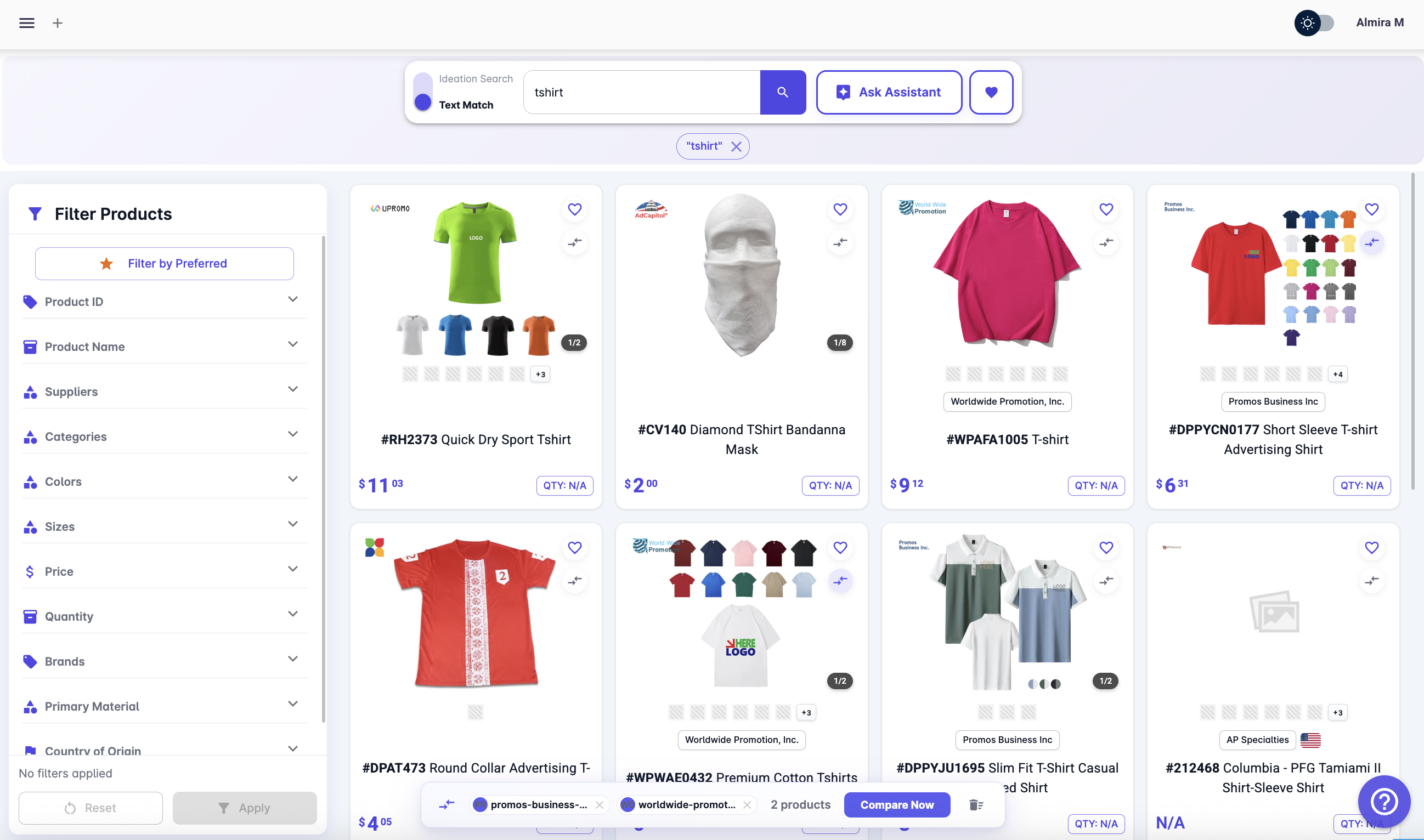
If your day involves finding products, comparing suppliers, checking inventory, and building quotes, Supplier Index was built for you.
Three modes, each built for a different moment. Use one or all three. They work together.
Try all three modes free for 30 days
Included with ShowCase, Sales Order and Storefront · No credit card required
Everything you need to source with more confidence, in less time.
About Supplier Index
Supplier Index is a unified promotional product search platform that brings together products from multiple suppliers into a single, searchable interface, enhanced with AI-powered ideation to help you discover better product options faster.
Traditional sourcing requires jumping between supplier websites, checking inventory, pricing, and decoration separately. Supplier Index brings all of this into one place, removing bias, saving time, and improving visibility across all suppliers.
Supplier Index provides inventory visibility by warehouse and color, helping you quickly assess availability before quoting. (Availability depends on supplier data feeds.)
Supplier Index includes decoration methods, locations, and options upfront, so you can evaluate feasibility before presenting or quoting products.
Supplier onboarding is the process of integrating supplier product data into Supplier Index. This includes bringing in product catalogs, pricing structures, inventory feeds, and decoration information so they can be searched and displayed in a standardized way.
You can also onboard your preferred suppliers directly by selecting them and entering your account details, such as your account number, EQP status, and PromoStandards API credentials, to ensure your pricing and access levels are accurately reflected.
If you're unsure how to obtain your PromoStandards credentials from a supplier, Supplier Index includes a built-in option to send a request email directly to the supplier, helping you complete the setup quickly.
The goal is to ensure consistent, accurate, and personalized data across all suppliers, so you can compare and evaluate products efficiently.
No. Supplier Index is included with ShowCase, Sales Order and Storefront, and with every Enterprise solution, rather than sold on its own. That way the products you find move straight into presentations, client stores, sales orders and purchase orders.
Yes. ShowCase, Sales Order and Storefront each come with a 30-day free trial, with no credit card needed, and Supplier Index is included in each of them.
Sourcing promotional products
Use a supplier search platform that connects to suppliers directly instead of jumping between supplier websites. Supplier Index lets you search 150+ PromoStandards suppliers in one place, by item code, product name, theme or a plain-language brief, with pricing, inventory and decoration details on the same screen.
Connect the suppliers you already have accounts with. In Supplier Index you enter your own supplier account number, EQP status and PromoStandards API credentials once, and pricing is returned from the supplier's system as your customer price, not a generic catalog rate. You can switch between Net, Customer and List pricing, blank or decorated, and FOB point on one screen.
Start a free trial of ShowCase, Sales Order or Storefront and you can search Supplier Index right away, with no complex setup. Then select the suppliers you already have accounts with and enter your account number, EQP status and PromoStandards API credentials once, so pricing and inventory reflect your own account. Products you find move into ShowCase, Storefront, quotes and purchase orders in one click.
Supplier Index pulls inventory from connected suppliers and shows it by color, size and warehouse in one grid. Each section shows whether the figures are live or cached, and you can request a fresh pull before you quote. Availability depends on each supplier's data feed.
Select the products you are considering, pick a color, enter quantities by size and your ship-to ZIP code. Product Compare returns total and per-unit landed cost, the closest warehouse and whether it can fill the order, all on your own account pricing.
Every product in Supplier Index has a decoration view: browse by imprint location, see the methods available there, and pull setup and run charges live from the supplier. See Product Details for what is shown per product.
Save products into Collections while you search. Name them by client or order, keep them private or share them with your team, and come back with pricing still connected to the supplier.
Ask where the price comes from: is it retrieved from the supplier against your account, or typed into a catalog by someone else? Then check how inventory is shown (by size and warehouse, or one total), whether decoration charges are live, whether you can see when a supplier connection is failing, and whether products move straight into presentations, quotes and orders.
Search 150+ suppliers with your pricing. See live inventory. Check decoration options. Included with ShowCase, Sales Order and Storefront.